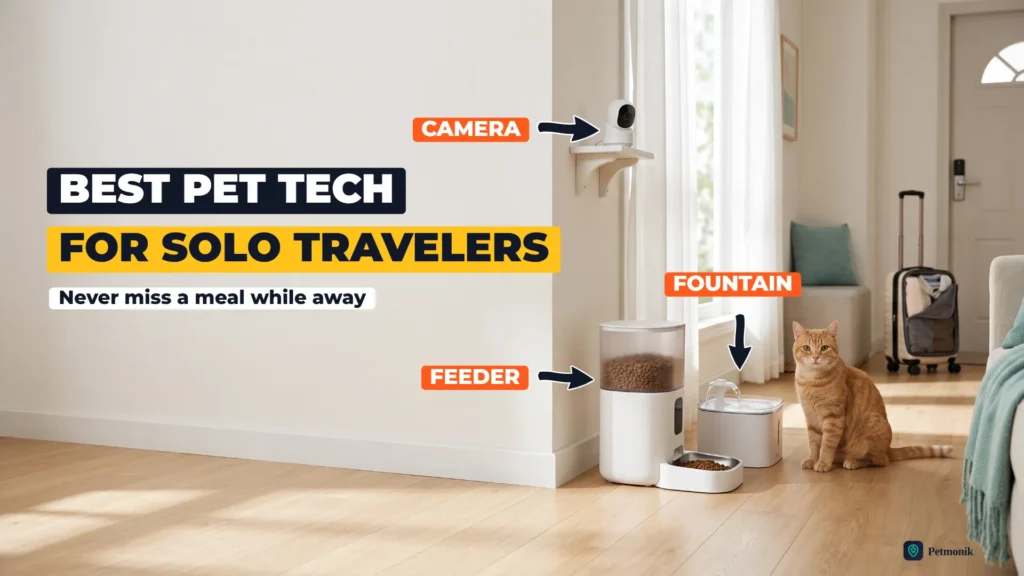
Three complete smart-pet setups, at three price points, can keep a solo traveler’s cat safe and fed for a long day or an overnight trip — we break down what to buy and how to set it up below. If you live alone and travel for work, or regularly work 12-hour days, your pet’s routine depends on things going right while nobody’s home: meals on time, fresh water, and someone noticing if something goes wrong. One caveat: PetMD says healthy adult cats can generally be left alone for 8–12 hours and recommends a pet sitter beyond 24 hours — these devices make a long day safer, they don’t replace a sitter on a longer trip, and none of them scoops the litter box.
Table of Contents
Best Smart Pet Feeder Camera Fountain Bundle: What You Actually Need
Each device covers a different failure, and leaving one out leaves a gap:
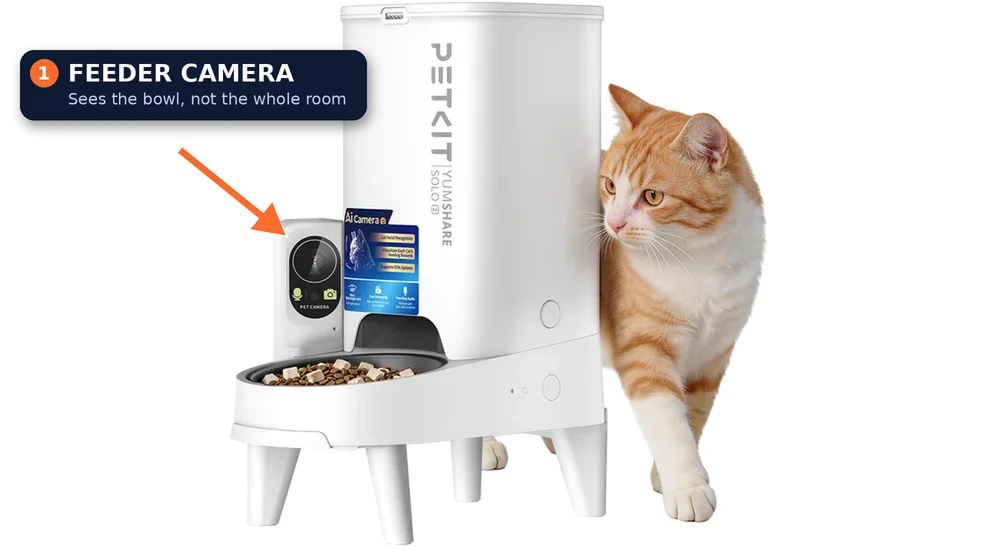
A feeder keeps meals on schedule and portions consistent. The feature that matters most for travelers isn’t the camera but the alerts: low food, jams and going offline. A jammed feeder is a missed meal you won’t know about otherwise.
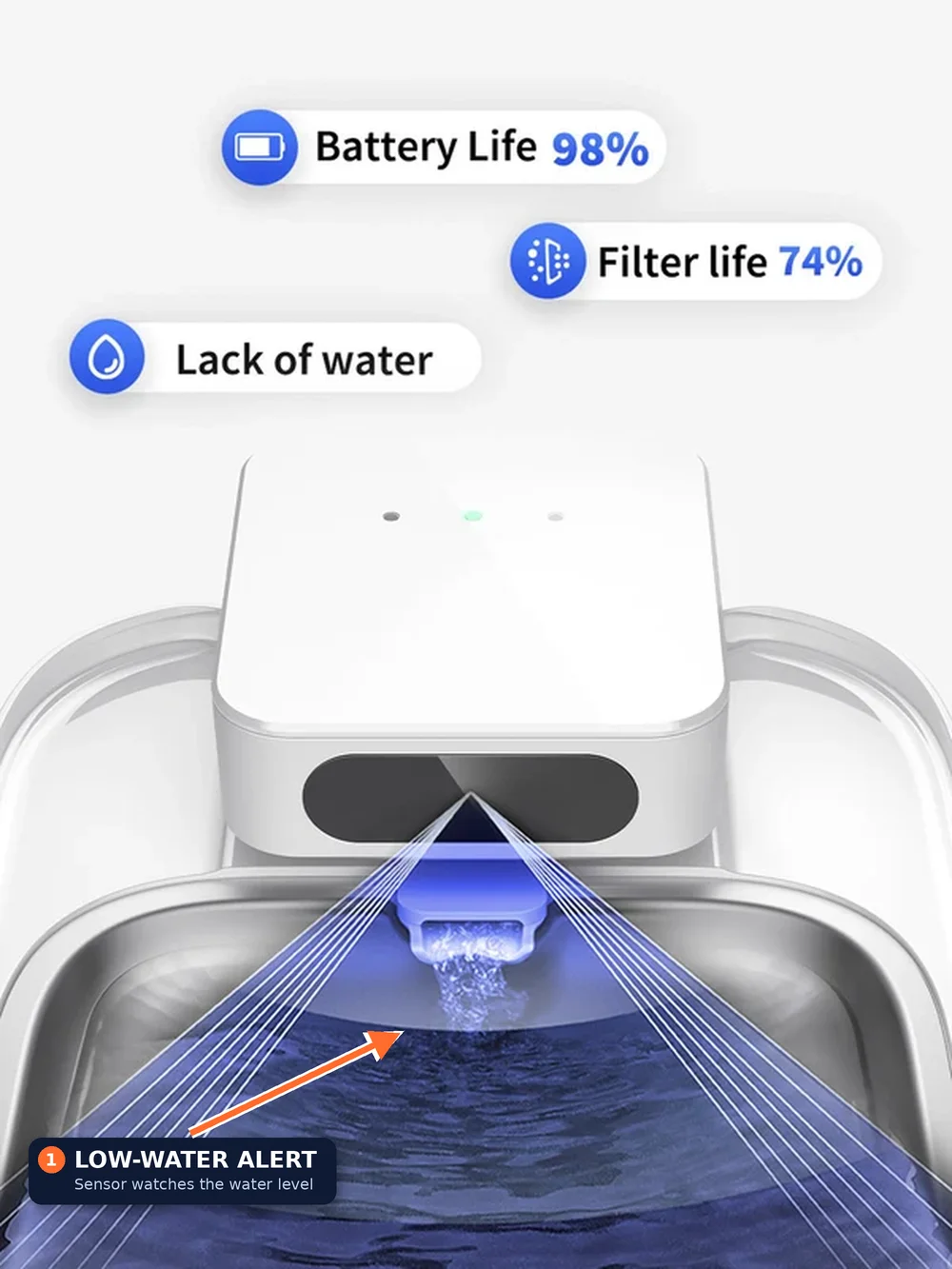
A fountain keeps water fresh and flowing for days. App-connected models warn you when the water runs low, and some log how often your pet drinks, which is an early sign of illness.
A room camera shows you everything the other two can’t: whether your pet is moving normally, whether it has been sick, whether the litter box is being used, and whether the fountain is actually running. A feeder camera only sees the bowl.
Source: PETKITSource: PETKIT
Three devices from different brands means three apps. We’ll get to that below.
T
1. The Best 3-Device Combo for Most Owners
$284.96 total at current prices
PETKIT YumShare Solo 2 feeder, Petlibro Dockstream 2 fountain and Wyze Cam v4.
The YumShare Solo 2 ($149.99) is the feeder we'd pick for most single-pet homes: a 3 L hopper, a camera that logs every meal with before-and-after photos, 2.4 and 5 GHz WiFi, and a battery backup that keeps it feeding for up to 14 days in a power cut. The Petlibro Dockstream 2 ($89.99) holds 3 L, tracks how often your pet drinks and sends trend alerts, and reminds you when to refill or change the filter (every two weeks for one pet, per Petlibro). The Wyze Cam v4 ($44.98) adds a 2.5K view of the room with colour night vision and two-way audio, and records to a microSD card without a subscription.
Why they work together: each device covers a different failure, and none depends on another brand's app to do its job. The feeder watches meals, the fountain watches drinking and the camera watches your pet.
The Best 3-Device Combo for Most Owners key specs
Feeder
PETKIT YumShare Solo 2 ($149.99)
Fountain
Petlibro Dockstream 2 ($89.99 at Petlibro)
Camera
Wyze Cam v4 ($44.98)
Apps
PETKIT, Petlibro, Wyze
Power backup
Feeder only (up to 14 days)
Optional plans
PETKIT Care+ for feeder video history; Wyze Cam Plus for smart alerts
The Granary WiFi ($89.99) has no camera, but it gets the essentials right: up to 10 scheduled meals a day, a 5 L hopper, app alerts for low food, blockages, low battery and faults, and a D-battery backup. To save money on water, we'd skip an app-connected fountain and pair a plain Petlibro Stainless Steel Fountain ($39.99) with a Wyze Cam v4 ($44.98) pointed at both the bowl and the fountain.
The trade-off is that the camera does the monitoring the smart devices would otherwise do: you won't get a low-water alert or meal photos, so you'll need to check the live view yourself once or twice a day.
Best Budget 3-Device Setup key specs
Feeder
Petlibro Granary WiFi ($89.99)
Fountain
Petlibro Stainless Steel Fountain ($39.99, no app)
Camera
Wyze Cam v4 ($44.98)
Apps
Petlibro, Wyze
Power backup
Feeder only (D batteries)
Pros
About $110 less than our main pick
Feeder alerts cover jams and low food
Only two apps
Cons
No low-water alerts or drinking data
No meal photos; you check the camera yourself
Best for shorter absences
B
3. Best Premium Setup
$419.98 for feeder and fountain, plus camera and plans
For anxious travelers, this setup tracks both eating and drinking in one app. The Dual-hopper 2 ($169.99) recognises up to 15 pets by face, logs each meal and holds 5 L across two hoppers, with four D batteries as backup. The EverSweet Ultra ($249.99) uses a 140-degree camera to log when each pet drinks and how much, and sends used water to a separate waste tank, so there's no filter to change. The Furbo 360 Cat Camera rotates to cover the whole room and adds treat tossing and two-way audio; its AI alerts for meowing and vomiting and its video history need a Furbo Nanny plan, which Furbo lists at an average of $6.99 a month billed annually. Furbo sells the camera itself with plan bundles and frequent discounts, so check the current price.
Best Premium Setup key specs
Feeder
PETKIT YumShare Dual-hopper 2 ($169.99)
Fountain
PETKIT EverSweet Ultra ($249.99)
Camera
Furbo 360 Cat Camera (price varies with plan)
Apps
PETKIT, Furbo
Plans
Furbo Nanny for AI alerts and video history; PETKIT Care+ for some feeder and fountain features
Pros
Feeder and fountain in one app
Per-pet eating and drinking records
Full-room camera with AI alerts
Cons
Most expensive by far
Several features sit behind subscriptions
More cameras mean more setup and privacy decisions
App Compatibility — Do These Devices Work Together?
Honestly, not much. Pet tech is fragmented: each brand runs its own app, and there’s no shared standard that lets a Petlibro fountain trigger a PETKIT alert or a Wyze camera react to a missed meal. In practice, that means:
Not sure which AI features in a bundle are actually worth paying for? We break it down in our AI pet feeder guide.
Three apps, three sets of notifications. Our recommended combo uses the PETKIT, Petlibro and Wyze apps. Each one needs notifications switched on, and each one needs checking.
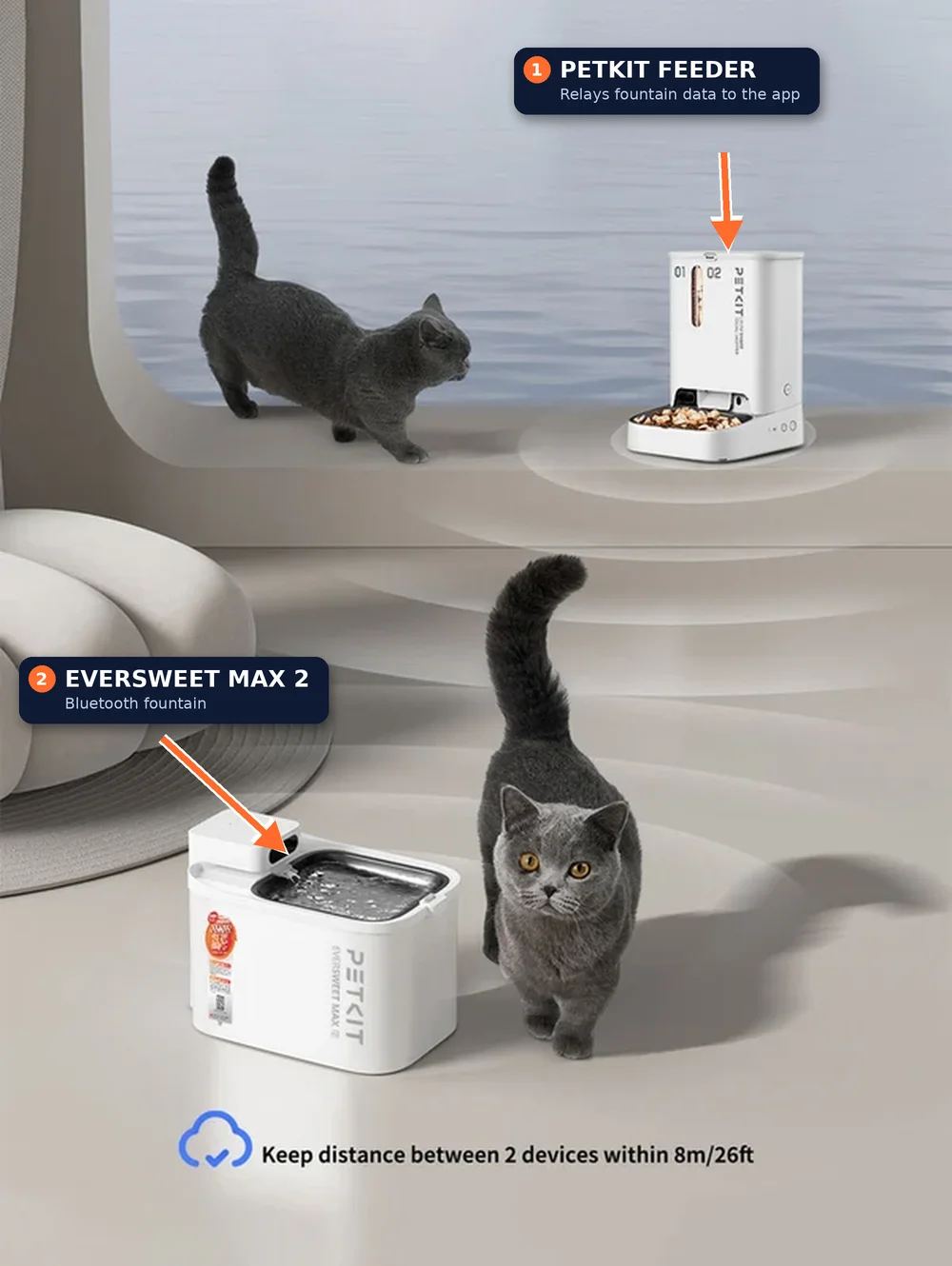
Staying in one brand helps. PETKIT’s feeders and fountains share one app. Its Bluetooth fountains, such as the EverSweet Max 2, need another PETKIT device to relay their data for remote access, so they only make sense alongside a PETKIT feeder.
Voice assistants are limited. Some feeders, including PETKIT models, have Alexa skills, but these handle basic commands, not cross-device automation.
Subscriptions multiply. Video history needs PETKIT Care+ on the feeder and Cam Plus on a Wyze camera for its smart alerts, and Furbo’s full feature set needs a Furbo Nanny plan. Check what you actually need before you subscribe to all three.
Source: PETKIT
Our advice: accept the extra apps, but put them in one folder on your phone, and decide in advance which alerts you’ll act on.
Setup Tips for Travelers
Set everything up at least a week before your first trip, and treat that week as a test run.
Scheduling
Split the daily portion into several smaller meals, so one missed or late meal isn’t the whole day’s food.
Keep meal times the same as your normal routine; cats notice changes.
Check that each device’s clock and time zone match your home, not where you’re travelling to.
Alert configuration
Turn on low-food, jam or blockage, low-water, low-battery and offline alerts in every app.
Set the camera’s motion zones to cover the feeding area and litter box, and switch off alerts for areas that trigger constantly, like windows.
Add a trusted neighbour or friend to the apps, if the brand supports sharing, so someone nearby gets the same alerts.
Backup power and connectivity
Fit fresh backup batteries in the feeder before every trip. The YumShare Solo 2 keeps feeding for up to 14 days on battery, but its camera switches off.
Know which devices have no battery: most corded fountains and the Wyze Cam v4 stop in a power cut. A small uninterruptible power supply (UPS) for your router, camera and fountain covers short outages.
Check your WiFi band. The Wyze Cam v4 and several fountains need 2.4 GHz, so make sure it’s switched on at your router.
Before you leave
Fill the hopper and fountain, fit a fresh filter, and run one manual feed while you watch it on the camera.
Leave a key and your vet’s details with someone who can get there within a few hours.
The bottom line: for most owners, a PETKIT YumShare Solo 2, a Petlibro Dockstream 2 and a Wyze Cam v4 cover meals, water and oversight for under $300 at current prices. Spend more only if you want AI tracking of both eating and drinking, and spend less only if you’re willing to check the camera yourself. Petmonik will update these setups as prices and models change; if you’ve built a travel setup that works, tell us through our contact page.
What is the best smart pet care setup for someone who travels solo?
For most owners, a PETKIT YumShare Solo 2 feeder, a Petlibro Dockstream 2 fountain and a Wyze Cam v4 cover meals, water and oversight of the room for under $300 at current prices. Spend more only if you want AI tracking of both eating and drinking, and spend less only if you’re willing to check the camera yourself.
How long can I leave my cat alone with a smart feeder and fountain?
PetMD says healthy adult cats can generally be left alone for 8 to 12 hours and recommends a pet sitter for anything beyond 24 hours. Smart devices make a long day or an overnight trip safer, but they don’t replace a sitter on a longer trip, and none of them scoops the litter box.
Do smart pet devices from different brands work together?
Not much. Each brand runs its own app and there’s no shared standard, so our recommended combo uses three apps (PETKIT, Petlibro and Wyze), each with its own notifications to switch on. Staying in one brand helps, since PETKIT’s feeders and fountains share one app, but voice assistant skills handle only basic commands, not cross-device automation.
What should I set up before leaving my pet with smart devices?
Set everything up at least a week before your first trip and treat it as a test run. Split the daily portion into several smaller meals, turn on low-food, jam, low-water, low-battery and offline alerts in every app, fit fresh backup batteries and a fresh filter, and run one manual feed while you watch on the camera. Leave a key and your vet’s details with someone nearby.
What happens to smart pet devices during a power cut?
The YumShare Solo 2 keeps feeding for up to 14 days on battery backup, but its camera switches off. Most corded fountains and the Wyze Cam v4 stop in a power cut, so a small uninterruptible power supply (UPS) for your router, camera and fountain covers short outages.
Sam Kerrow is the lead editor and smart pet technology researcher at Petmonik. Focusing on multi-pet households, RFID and AI selective feeders, smart hydration fountains, and pet telemetry data, Sam tests device reliability, firmware behavior, and practical troubleshooting for cat and dog owners.